Quick recap
- Data Engineer: skills and responsibilities
- Data Engineering lifecycle
Agenda
- Revision
- System overview
- Memory hierarchy
- Storage engines
- Log based storage
- Hash indexes
Why study storage internals?
- To pick right tools for your use case
- To be able to tune the configurations of storage engine as per your requirements
Storage engine overview
| Property | Transaction processing systems(OLTP) | Analytics processing(OLAP) |
|---|---|---|
| Primarily used for | End user/customer, via web application | Internal analyst, for decision support |
| What data represents | Latest state of data (current point in time) | History of events that happened over time |
| Dataset size | Gigabytes to terabytes | Terabytes to petabytes |
| Main write pattern | Random-access, low-latency writes from user input | Bulk import (ETL) or event stream |
| Main read pattern | Small number of records per query, fetched by key | Aggregate over large number of records |
| Implementation types | - Log structured database - B tree based databases |
- Columnar storage |
Quick Revision
System overview
Layered architecture
 Image credits: CSAPP
Hardware overview
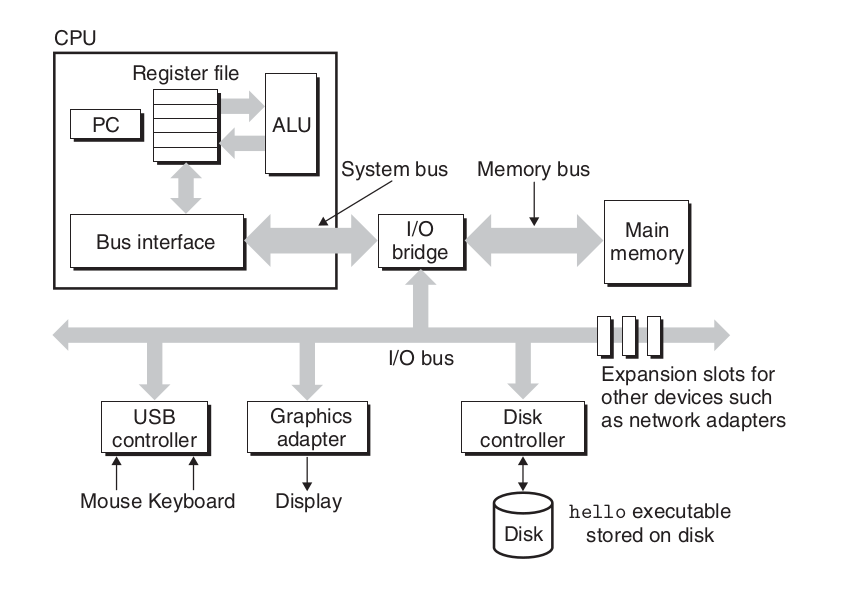 Image credits: CSAPP
Buses are like nervous system of the computer. Data moves from one place to another via buses. Buses are charecterized by word size as well as bits that can be transfered in a given time.
IO devices are what connects a computer to external world. It"s like humans have 5 senses, computer has IO devices. 4 key IO devices that we will concern ourselves with are:
1. Display: out device through which computer talks back with the user.
2. Keyboard/mouse: input device through which computer listens to the user
3. Storage device: This is the long term storage that computer has. All programs initially lies here.
Main memory is the area where program is loaded when it is to be run and it stays there while it"s being executed. Think of it like short term memory in humans. Any task in ordered to be done should inside our memory.
Processor is where results and addresses are computed in the program. It has 3 main parts:
1. Program counter
2. registers
3. ALU(Arithmetic and Logical unit)
Memory hierarchy
Storage devices
- Random Access Memory
- Static RAM(SRAM) is used for cache memories, both on and off the CPU chip.
- DRAM(Dynamic RAM) is used for the main memory plus the frame buffer of a graphics system.
- HDD(Magnetic Storage) use spinning magnetic platters to store data. A read/write head moves over the platters to read or write data.
- Solid state disks(SSD) store data on interconnected flash memory chips that retain data even when powered off.
Memory hierarchy and Cache
The storage devices in every computer system are organised as a memory hierarchy. As we move from the top of the hierarchy to the bottom, the devices become slower, larger, and less costly per byte.
The main idea of a memory hierarchy is that storage at one level serves as a cache for storage at the next lower level. Thus, the register file is a cache for the L1 cache. Caches L1 and L2 are caches for L2 and L3, respectively. The L3 cache is a cache for the main memory, which is a cache for the disk.
lscpu | grep cache;getconf -a | grep CACHE
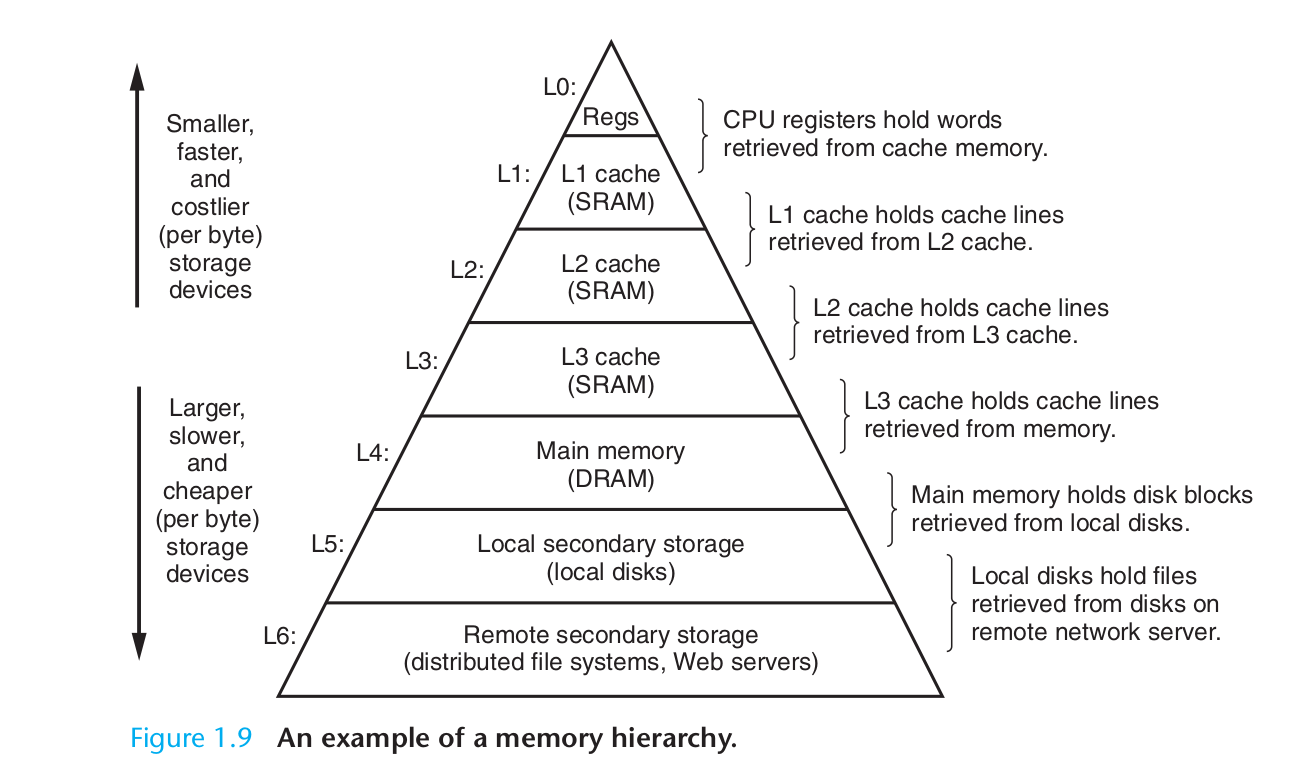 Image credits: CSAPP
Caching
- Hardware : Registers, L1, L2, L3 act as cache for main memory.
- Operating system: Main memory acts as cache for disc while implementing virtual memory.
- Application programs: Browser cache recently accessed web pages for faster loading.
Locality principles
Cache leads to improved performance because of following principles:
Temporal locality: a memory location that is referenced once is likely to be referenced again multiple times in the near future.
Spatial locality: if a memory location is referenced once, then the program is likely to reference a nearby memory location in the near future.
Relative latencies

Image credits: relative-time-latencies-and-computer-programming
Disk access
HDD VS SSD
 Image credits: Backblaze
Total Read Time = Seek time + Rotational latency (HDD only) + Transfer time (sequential read)
HDD vs SSD
| Pattern | HDD | SSD |
|---|---|---|
| Sequential read | Excellent | Excellent |
| Random read | Terrible | Acceptable |
| Seek cost | Dominant | None |
| Throughput | High if sequential | High |
| Latency variance | Huge | Small |
Log based storage
Refer code
A log is an append-only sequence of records. It doesn’t have to be human-readable; it might be binary and intended only for other programs to read.
#!/bin/bash
db_set () {
    echo "$1,$2" >> database
}

db_get () {
    grep "^$1," database | sed -e "s/^$1,//" | tail -n 1
}
| Pros | Cons |
|---|---|
| - Faster writes since appending to a file is a cheap operation | - Read complexity is O(n) since each read requires us to read the whole file |
Log based storage + hash indexes
Refer code
Key idea: Along with appending to the log file maintain a in-memory hashmap that acts as a signpost to the actual keys.
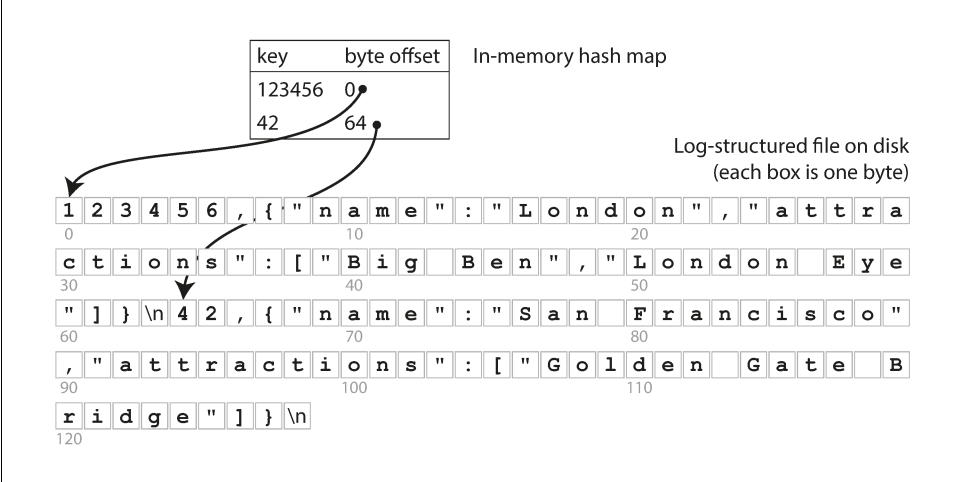 Image credits: Designing Data-Intensive Applications
Implementation details:
- How do we avoid running out of disk space?: via compaction: Process of timely removing the duplicates from segment file.
- File format: CSV is not the best format for a log. It’s faster and simpler to use a binary format that first encodes the length of a string in bytes, followed by the raw string (without need for escaping).
- How to delete record? If you want to delete a key and its associated value, you have to append a special deletion record to the data file (sometimes called a tombstone). When log segments are merged, the tombstone tells the merging process to discard any previous values for the deleted key.
- Crash recovery:
- Read all segment and regenerate hash map on service restart(painful if we have large segment files)
- Maintain hashmap on disk also and read it into memory on restart.
- Concurrency: One write thread, multiple read thread
Tradeoffs
Pros:
- Appending and segment merging are sequential write operations, which are generally much faster than random writes, especially on magnetic spinning-disk hard drives.
- Concurrency and crash recovery are much simpler if segment files are append-only or immutable.
- Merging old segments avoids the problem of data files getting fragmented over time
Cons:
- Hash table must fit into main memory. so if you have a very large number of keys, you’re out of luck.
- Range queries are not efficient. For example, you cannot easily scan over all keys between kitty00000 and kitty99999—you’d have to look up each key individu‐ ally in the hash maps.
References
- Chapter 1, Computer Systems: A Programmer's Perspective(CSAPP)
- Chapter 3, Designing Data intensive Applications
- Bitcask - A Log-Structured fast KV store